


Smartphone batteries are getting bigger, as the phones are being tasked with doing more and more. However, I often hear people complain that even new mobile phones have much shorter battery life after just one year. Some even need to be recharged after only half a day! So, how can we make our battery last longer? The key factors to consider are temperature and how we use power.
Battery health is a percentage that tells you how much of the battery’s original capacity it still holds. A new iPhone has 100% capacity. At 79%, your battery holds 79% of its capacity. So if it originally lasted 12 hours, it now lasts around 9.5 hours.


Apple shows this under Settings App  → Battery → Battery Health & Charging.
The number matters, but what people don’t realise is that degradation is completely normal.
Apple’s standard for an acceptable battery depends on the hardware generation:
- iPhone 14 and earlier: 80% capacity after 500 full charge cycles.
- iPhone 15 and later: 80% capacity after 1,000 full charge cycles.
The average user completes roughly 300 cycles per year.
Pro Tips
iPhone 14: 500 cycles ÷ 300/year = ~20 months of typical use.
iPhone 15 & 16: 1,000 cycles ÷ 300/year = ~40 months of typical use.
The threshold is a hardware design limit, not a defect. If yours is degrading faster, something in your charging habits is accelerating these.
Lithium-ion batteries hate extremes. Charging to 100% every night and draining to 0% regularly is the fastest path to degradation. The sweet spot is keeping the battery in the 20-80% range for daily use. You don’t have to be obsessive about it — the occasional 100% charge for a long travel day is fine. Just don’t make it the default.
The Optimized Battery Charging Features in iOS 26 can help it. See below.
Heat is the number one killer of battery capacity. Charging on a thick case, leaving your iPhone on the car dashboard in summer, or gaming heavily while plugged in all generate more heat than the battery likes. If your phone feels warm while charging, that’s charge cycles burning faster than they need to.
We’ve seen iPhone batteries in Hong Kong summers drop 10-12% in battery health in a single year purely due to heat exposure. Take the case off when charging overnight if your case is thick.
The 20W or 30W fast charger Apple sells is convenient, but it generates more heat than a slower USB-A 5W or 12W charge. For overnight charging — when speed doesn’t matter — a slower charger puts less stress on the battery. Save the fast charger for when you actually need it.
Plugging in at 10pm and waking up at 7am means your iPhone spends 6-7 hours sitting at 100%, which stresses the battery. This is exactly what Optimised Battery Charging was designed to solve — we’ll get to that in the next section.
This one surprises people. A weekly restart clears background processes that can keep the processor (and battery) warmer than it needs to be. It also resets minor software states that accumulate over time. Thirty seconds, once a week. Small thing, real effect.
Settings App → Battery → Battery Health & Charging → Optimised Battery Charging
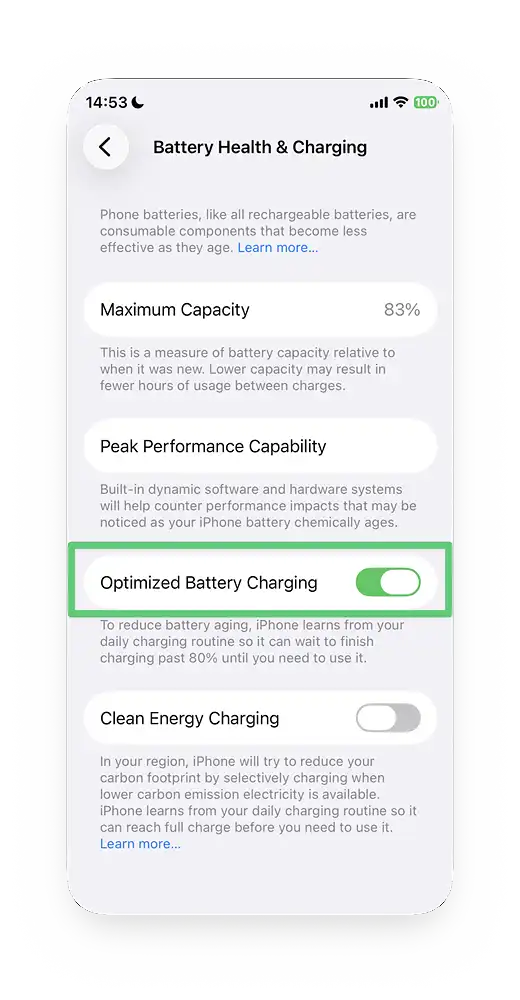
This feature learns your charging routine and delays charging above 80% until just before you typically wake up. In iOS 26, it got smarter — it now adapts faster to irregular schedules rather than requiring a consistent week of data to activate. Turn this on. Leave it on.
Settings App → Battery → Battery Health & Charging → Charging Optimisation → Set Limit
This is what power users have wanted for years: a hard cap for your iPhone’s charge at 80%, 85%, 90%, or 95%. It won’t charge past that limit, ever. No algorithm, no exceptions.
Per Apple Support, this feature is restricted to the iPhone 15 and later.
Who should use it: Anyone who keeps their phone plugged in for long periods—desk workers, overnight chargers, or those on long CarPlay commutes. If your device sits on a charger, capping it at 80% is the single most effective action you can take for long-term battery health.
Who shouldn’t bother: Users who need every percentage point of range just to survive the day. If your battery life is already a bottleneck, the daily tradeoff isn’t worth the long-term gain.
Settings App → Battery → Adaptive Power Mode
This is not Low Power Mode. Instead of crippling performance and disabling features, Adaptive Power Mode monitors your habits. It subtly reduces background refresh, location polling, and display brightness when it predicts you won’t notice. It extends battery life without the friction.
Per Apple Support, this feature requires specific hardware: the iPhone 15 Pro, iPhone 15 Pro Max, or any iPhone 16 or iPhone 17 model.
Turn it on. The performance impact in normal use is negligible, and it genuinely extends battery life without the annoyances of Low Power Mode.
This is the question we get most often. And it’s the right question to ask.
The number on the screen isn’t the whole story — a refurbished iPhone at 85% from a seller who inspected it properly is a better buy than a “brand new” grey-market phone with hidden battery stress. But the number still matters.
| Battery Health | What It Means | OLA TECH Recommendation |
| 100% – 85% | Excellent | Keep it. Charge freely. These are well-maintained devices. |
| 84% – 80% | Good | Still fine for daily use. Minor range reduction only. |
| 79% – 75% | Acceptable | You’ll notice shorter battery life. Budget for a replacement within 12 months. |
| Below 75% | Declining | Don’t buy at this health unless the price reflects it significantly. |
| Below 70% | Replace Now | Apple considers this threshold for battery service. Replacement is overdue. |
Pro Tips
If a refurbished iPhone listing doesn’t mention battery health at all, that’s a red flag. A seller who has inspected their stock properly will always disclose it. Ask before you buy.
Yes, slightly. Wireless charging generates more heat than wired charging, especially if your case stays on during charging. For daily use it’s fine. For overnight charging, a cable is kinder to your battery.
No. Once capacity is lost, it’s gone. The only option is a battery replacement. What you can do is slow the rate of future degradation with the habits above.
Heavy gaming does accelerate degradation — high processor load + sustained screen brightness + heat is a bad combination. If you game heavily, keep the device on a flat surface while playing (not on a pillow or couch cushion that traps heat), take the case off, and don’t charge simultaneously if you can avoid it.
Once a month is plenty. Weekly checking creates anxiety without insight — battery degradation is slow enough that weekly changes are barely measurable. Set a monthly reminder if you care about tracking it.
Where to Go From Here
If you’re buying a refurbished iPhone and have questions about the specific unit’s battery health — what we test for, what we replace, what we refuse to sell — our buying guide covers exactly what to check before you hand over money.
Set the Charge Limit today. You will notice the difference.
And if you’re already dealing with an iPhone that’s struggling past the half-day mark, browse our certified refurbished iPhones (from iPhone 11 to iPhone 15 Pro)—they’re affordable, sustainable, and backed by our 90-day warranty for complete peace of mind.